
— Wildlife Cameras
Add Hunter 4G Mini to the app
Follow these steps to quickly and easily set up your Hunter 4G Mini in the app.
Telsiz fotokapanlarımıza uygun olarak Modernhunter uygulamasını geliştirdik. Kendi fotokapanlarımızın yanı sıra uygulama, piyasada bulunan neredeyse tüm gönderici fotokapanlarla birlikte çalışır. Böylece artık akıllı telefonunda birden fazla fotokapan uygulaması bulundurmana gerek kalmaz. Uygulamayı bugün akıllı telefonuna indir!


Modernhunter, fotokapanlarını profesyonelce yönetmek isteyen avcılar için geliştirildi. Marka fark etmeksizin — uygulamamızla tüm kameralarını takip edebilir ve görüntüleri doğrudan akıllı telefonuna alabilirsin.

Farklı üreticilerin fotokapanlarını tek bir uygulamada yönet. Uygulama, piyasada bulunan neredeyse tüm gönderici fotokapanları destekler.
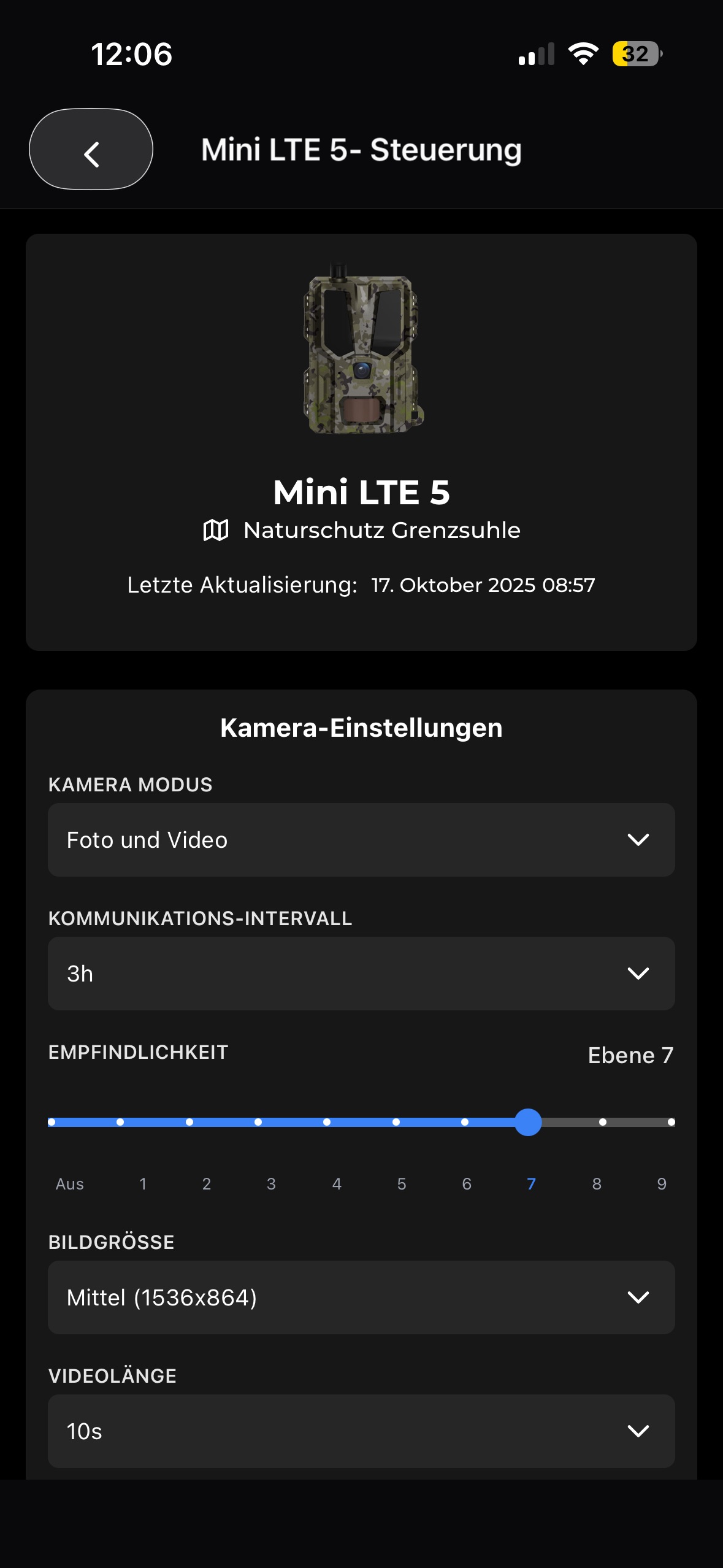
Fotokapanlarını doğrudan uygulamadan kontrol et. Fotoğraf ve video çözünürlüğü, PIR sensörünün hassasiyeti veya gönderim aralıkları gibi ayarları düzenle.
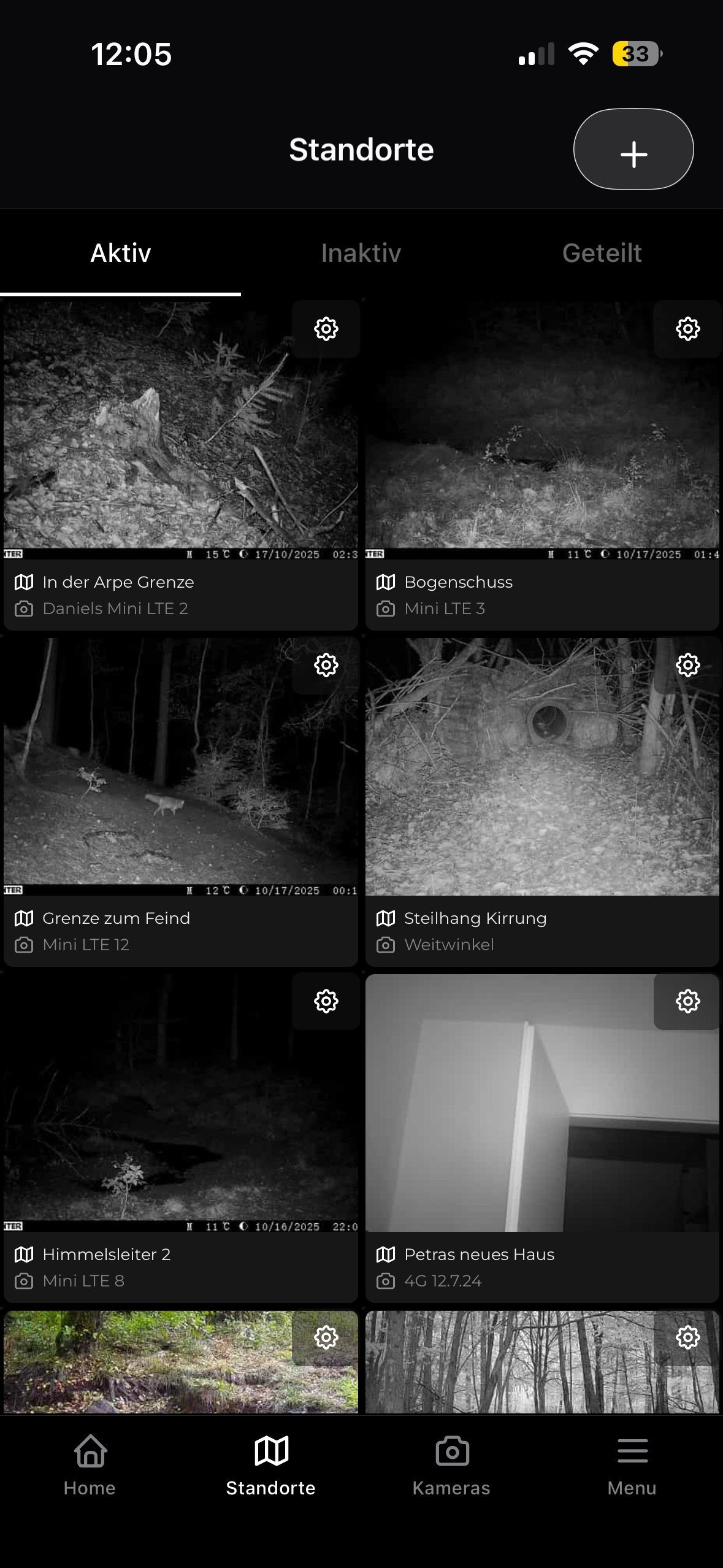
Kameralarını kamera adlarına göre değil, konumlara göre düzenle. Kameraları farklı konumlar arasında esnek şekilde taşı.
Uygulama, fotokapan, SIM ve av sahası ile ilgili her şey — hızlıca bulunur ve anlaşılır şekilde açıklanır. Başka soruların mı var? Bize ulaş.
Follow these steps to quickly and easily set up your Hunter 4G Mini in the app.
The Hunter 4G Mini wildlife camera comes with the following components:
The Hunter 4G Mini wildlife camera can be conveniently controlled and configured remotely via the Modernhunter app or the web app. This allows you to manage your camera completely remotely without having to be on site.
The camera operates in energy-saving mode during normal operation. In this state, it is not permanently online and cannot receive commands immediately.
The connection interval determines how often your camera automatically connects to your Modernhunter account. This regular contact is important when no recordings are being sent, but the camera still needs to receive commands or setting changes.
In the Hunter 4G Mini camera settings, you can set two different working times. These are referred to as Active Schedule 1 and Active Schedule 2 .
The older Hunter 3G and Hunter 4G models can also be easily set up and used in the app.
If your camera is not sending images, there could be several reasons for this. Please check the following points step by step.
The camera takes a picture as soon as the PIR sensor (motion sensor) detects a moving heat source. However, if you receive an image that shows no visible movement, there could be several reasons for this.
In rare cases, not all LED status indicators may light up when the wildlife camera is switched on for the first time.
Choosing the right batteries depends primarily on the outside temperature. Different types of batteries are more suitable depending on the season.
Seissiger wildlife cameras with Supersim can be easily integrated into the Modernhunter app. Setup takes just a few steps.
These instructions apply to SEISSIGER Special-Cam models in the standard version (SIM-free). They do not apply to the Supersim Edition.
Follow these instructions to set up your Zeiss Secacam so that all recordings automatically appear in your Modernhunter account.
Follow these instructions to set up your ICU wildlife camera so that all recordings automatically appear in your Modernhunter account.
Follow these instructions to set up your Dörr wildlife camera so that all recordings automatically appear in your Modernhunter account.
Unfortunately, it is not yet possible to integrate Spypoint wildlife cameras into Modernhunter.
Push notifications can be turned on and off in the app. To do this, go to Settings in the side menu and you will find the option Activate notifications at the bottom.
🔗 Connect contacts
On the camera page, you will find a clear overview of all connected cameras. This allows you to immediately see the current status of each camera.
Reduce the image resolution, use a strong mobile network connection, and check whether your smartphone’s power-saving mode is enabled.
If you want to top up credit to operate your trail camera with a Modernhunter SIM card — or if the four-week trial period of your Hunter 4G Mini has expired — simply visit the website www.modernhunter.de .
The cost of sending a photo depends on the file size. Files are billed in 300 KB increments:
The cost of sending a video depends on the file size. Files are billed in 300 KB increments:
No, you only need to top up credit once per account. The credit is stored centrally in your user account and can be shared by all cameras using a Modernhunter SIM card.
The Modernhunter Hunter 4G Mini is already preconfigured for use with the Modernhunter SIM card. For other cameras without SIM lock, please enter the following data so that the camera can operate with the Modernhunter SIM card:
When you top up credit for your Modernhunter SIM cards, you can conveniently pay via PayPal or credit card. Each payment is automatically recorded and properly processed in our system.
Possible cause: oxidized SIM card
In the Modernhunter Shop, you can order Modernhunter SIM cards for €5 each.
The Modernhunter SIM card is a multi-network card. This means it can connect to all available mobile networks across Europe — in 41 countries and over 125 different networks.
You can use your Modernhunter camera in all countries of the European Union as well as in Switzerland, Norway, and the United Kingdom.
Yes, the Modernhunter SIM card can be used in all Modernhunter cameras as well as in cameras without a SIM lock.
Yes, with Modernhunter this is easily possible. As soon as a camera sends a photo, the SIM card used is automatically assigned to that camera.
Bize yaz — genellikle bir iş günü içinde yanıt veriyoruz.